Guidelines for Posters & Presentations
Welcome presenters!
Please click the tab below that matches your presentation type.
Where & How Do I
Upload
my Presentation Files?
ECHO is currently ONLY open for Digital Poster creation and Traditional Poster PDF upload.
All other session types (educational, oral, power pitch, flash sessions, etc.) will be able to upload in mid-April. Please watch this site for updates.
Your presentations will be created or uploaded within  ECHO. Please log in to ECHO, select My Conferences and then My Sessions and select Upload to begin the process. For details and requirements for specific presentation types, please see the tabs on the left.
DO NOT EMAIL PRESENTATIONS!
Presentations that are e-mailed will be deleted.
Important Note for ALL Presentations:
Patient confidentiality must be protected.
No names or fully exposed faces should appear in illustrations or images.
Downloadable
Declaration Slides
for Oral & Educational Presentations
Accreditation Council rules require that every oral presentation begin with the speaker making a disclosure of relevant financial interests or relationships. This disclosure must be done both via a slide and orally during the presentation, and will be in addition to the published disclosures in the Syllabus and Proceedings.
Declaration slides are MANDATORY for oral and educational presentations, even if you have nothing relevant to declare. You will NOT be permitted to continue to present if this disclosure is not made.
Declaration slides are STRONGLY RECOMMENDED for all other presentation types.
Choose the appropriate slide from the list below and click the link to download the PowerPoint template file to your computer.
.PPTX
For PowerPoint (2007-20XX, 365) and Keynote users
.POTX
Template file for PowerPoint (2007-20XX, 365) users (PC)
.PPT
For older versions of PowerPoint (97-2003)
Guidelines for
Scientific Oral Sessions
in Cape Town
ECHO is currently ONLY open for Digital Poster creation and Traditional Poster PDF upload.
Eight (8) minutes are allotted for your oral presentation followed by 3 minutes for discussions.
Upload your PowerPoint/Keynote slides via ECHO for presenting in the meeting room. To upload, log in to ECHO, go to My Conferences and then within the Cape Town conference, select My Sessions. Here you will see the option to upload your presentation.
To present your research effectively in this limited time, do not attempt to cover too much material. Discuss only the major points of your work, especially the conclusions drawn from your data. Do not include commonly known background information.
Begin with your title slide and include authors. Your next slide should be your declaration of financial interests or relationships. It should show the same “declaration” information you provided when you submitted the abstract. Please see the declaration slide tab to download the template slides.
Declaration slides are MANDATORY even if you have nothing relevant to declare. Your slides will NOT be presented if this disclosure is not made.
Next, briefly cover the background and motivation, but focus your time on methods, results, discussion, and conclusions. If there is to be an acknowledgement, it should be on one slide at the end and not a part of the formal oral presentation. Do not spend excessive time on title, co-authors, historical work, motivation, and too little on methods, results, and discussion.
Practice your presentation until you can present it clearly in nine minutes. If you use more than your allotted time, the moderator of the session will terminate the presentation. A useful rule for slides is to use no more than one (1) slide for each minute of your presentation. For suggestions on preparing slide presentations and technical requirements, please view the SLIDE DESIGN tab. In order to make all slides legible from any seat in the room, we strongly advise using large, readable fonts and uncrowded slides, for example readable on a laptop from as far as 2-3 meters away. Finally – try to make your presentation understandable to a broad audience:
- Give a brief background that provides context
- Use simple slides, and avoid needless details.
- Label your diagrams and images with arrows and words (avoid a,b,c when you can label images directly!)
- Discuss reasonable applications, next steps, and limitations of your work.
- Summarize the impact of your work.
Before the Session
All speakers are required to check in to the Speaker Ready Room and test their presentations. No exceptions. It is best to do this at least 24 hours before your session to allow time to fix any issues that may arise moving to the ISMRM provided computer. The location and operating hours of the Speaker Ready Room are noted in the Vital Details column to the right.
IMPORTANT: Online submission does not excuse a speaker from checking into the Speaker Ready Room.
Check Your Work!
Double- and triple-check your presentation before submitting. We suggest having a friend or colleague review the presentation as well, if possible, to look for problems you may have missed.
Presentation Guidelines
Speaker Ready Room
Speakers will have a quicker check-in process by uploading their presentation via the meeting website. Presentations and updates can be uploaded in the speaker ready room.
Presentations submitted online will be available on a Speaker Ready workstation for review.
- Please make sure all fonts display as expected (use the EMBED FONTS feature in PowerPoint) and all audio/video clips play properly.
- All hyperlinks (usually blue and underlined with a link to a website, e-mail address or document) should be removed.
- Patient confidentiality must be protected. No names or fully exposed faces should appear in illustrations or images.
All oral presentation editing must be completed 30 minutes prior to the start of your session. Only one PowerPoint/Keynote file may be submitted for each assigned speaking time.
Session room computers are all configured the same and have some important limitations:
- There is no Internet access available on the session room computers.
- There will be NO keyboards at the session room computers. A presentation must function only with a mouse.
- Software cannot be installed on session room computers.
- There are no video ports or other connections at the podium for a speaker’s laptop or other device. Do not plan to use your own device for your presentation.
- The image on the preview monitor will be the same image that is projected to the audience. Displaying notes (i.e. Presenter View) is not an option for this reason.
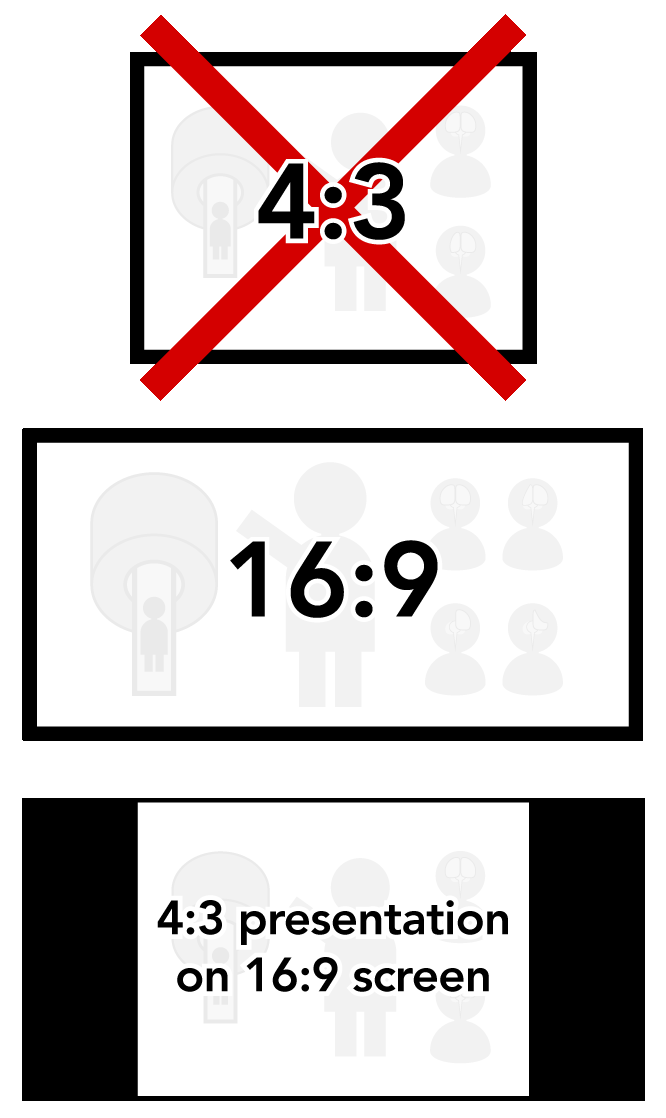 All screens in the meeting rooms will be 16:9 widescreen format. To take advantage of this, speakers must set the PAGE FORMAT or SLIDE SIZE to 16:9 widescreen prior to creating their presentation. While square presentations (4:3) will work, there will be black bars on both left and right sides of the video (see illustration).
IMPORTANT NOTE: If your PowerPoint presentation contains video files, it is very important that they are tested in the Speaker Ready Room as early as possible. If your video file fails to display properly, it may take hours to fix in some cases. Windows users with Office 365 or PowerPoint 2016 and newer can avoid this by using the Optimize Compatibility function (File -> Info) before saving your presentation. If the video cannot be optimized, there is a good chance it will not play when presented at the meeting.
Guidelines for
Educational Session Presentations
in Cape Town
ECHO is currently ONLY open for Digital Poster creation and Traditional Poster PDF upload.
All other session types (educational, oral, power pitch, flash sessions, etc.) will be able to upload in mid-April. Please watch this site for updates.
The length of educational presentations varies by session, so please check your invitation to find out the duration of your talk and/or contact the session organizers if you are unsure.
- Upload your PowerPoint/Keynote slides to ECHO. To upload, log in to ECHO, go to My Conferences and then within the Cape Town conference, select My Sessions. Here you will see the option to upload your presentation.
- Consider making full use of current features available in PowerPoint or related programs.
- Provide an introduction that enables a broad audience to understand your presentation, such as a disease overview for medically oriented presentations, or a careful list of advantages/disadvantages of techniques to those who may not follow the technical details
- Try to make at least 25% of your presentation understandable to 75% of the membership!
- Check the Slide Design tab for suggestions.
- Patient confidentiality must be protected. No names or fully exposed faces should appear in illustrations or images.
- You must include a slide with your declaration of financial interests or relationships. It should show the same “declaration” information you provided when you submitted the abstract. Please see the Declaration Slides tab to download the template slides.
- This is MANDATORY even if you have nothing relevant to declare. Your slides will NOT be presented if this disclosure is not made.
Guidelines for
Power Pitches
in Cape Town
ECHO is currently ONLY open for Digital Poster creation and Traditional Poster PDF upload.
IMPORTANT!
- Virtual presentation is not possible during the meeting.
- Your PowerPoint slides will be used for your 2-minute pitch presentation from the lectern. Your pitch will be included in the session recording, which will be posted online after the meeting.
- UPLOAD AVAILABLE MID-APRIL
- After all 2-minute pitch presentations have been made, you will go to your assigned poster station. You will then use your digital poster for discussing your data. This is not recorded, but the digital poster will be available online for viewing after the meeting.
- UPLOAD AVAILABLE NOW
A two-hour Power Pitch session comes in two parts. The first hour is a rapid-fire series of two-minute pitches by all presenters in that session. Afterwards, the presenters go to their digital poster stations (in the same room) for the second hour, where they can discuss their work with any interested attendees at a Digital Poster. Power Pitch presenters will need to upload two files:
- 2-minute PowerPoint slide deck for your pitch. You will present this slide show live in the Power Pitch Theater.
- Important note: Only PowerPoint files can be submitted. Keynote and video files will NOT be accepted.
- Digital Poster. Follow the guidelines for submitting a Digital Poster (see tab at left). You will create your digital poster in ECHO.
- To create the Digital Poster, log in to ECHO, go to My Conferences and then within the Cape Town conference, select My Sessions. Here you will see the options to create the digital poster.
- Uploading of PowerPoint slides will be available by mid-April.
Check Your Work!
Double- and triple-check your presentation before submitting. We suggest having a friend or colleague review the presentation as well, if possible, to look for problems you may have missed.
The Pitch
Test your 2-minute pitch presentation prior to your session by visiting the Speaker Ready Room. You can make this process faster by uploading your pitch as early as possible.
- Please make sure all fonts display as expected (use the EMBED FONTS feature in PowerPoint) and all audio/video clips play properly.
- All hyperlinks (usually blue and underlined with a link to a website, e-mail address or document) should be removed.
All editing should be completed 2 hours prior to the start of your session. Only one PowerPoint file may be submitted for each assigned speaking time. All screens in the exhibition hall will be 16:9 format. To take advantage of this, speakers must change the PAGE FORMAT or SLIDE SIZE to 16:9 widescreen prior to creating their presentation. While square presentations (4:3) will work, there will be black bars on both left and right sides of the video (see illustration). Computer & software details are in the Vital Details column to the right. IMPORTANT NOTE: If your 2-minute PowerPoint presentation contains video files, it is very important that they are tested in the Speaker Ready Room as early as possible. If your video file fails to display properly, it may take hours to fix in some cases. Windows users with Office 365 or PowerPoint 2016 and newer can avoid this by using the Optimize Compatibility function (File -> Info) before saving your presentation. If the video cannot be optimized, there is a good chance it will not play when presented at the meeting.
A Note to Apple Mac users:
Keynote files will NOT work for Power Pitches. The PowerPoint file must have the .PPT or .PPTX suffix to be accepted.
The Digital Poster
The Digital Poster portion of your power pitch presentation will be presented in the Power Pitch Theatre following the 2-minute pitches. It will follow the format of other Digital Posters – see the Digital Posters tab at left for all details.
Guidelines for
Flash Presentations
in Cape Town
ECHO is currently ONLY open for Digital Poster creation and Traditional Poster PDF upload.
IMPORTANT!
- Virtual presentation is not possible during the meeting.
- Your PowerPoint slides will be used for your 2-minute pitch presentation from the lectern. Your pitch will be included in the session recording, which will be posted online after the meeting.
- UPLOAD AVAILABLE MID-APRIL
- You will present your traditional poster at your assigned posterboard during the second hour of your session. This is not recorded.
- UPLOAD AVAILABLE NOW
A two-hour Flash Presentation session comes in two parts. The first hour is a rapid-fire series of two-minute pitches by all presenters in that session. Afterwards, the presenters go to their traditional poster stations (in the same room) for the second hour, where they can discuss their work with any interested attendees at a Traditional Poster.
Flash Presentation presenters will need to upload two files:
- 2-minute PowerPoint slide deck for your pitch. You will present this slide show live in the session room.
- Important note: Only PowerPoint files can be submitted. Keynote and video files will NOT be accepted.
- Traditional Poster. Follow the guidelines for submitting a traditional poster (see tab at left). You will upload a pdf of your traditional poster in ECHO.
- To upload the traditional poster PDF, log in to ECHO, go to My Conferences and then within the Cape Town conference, select My Sessions. Here you will see the option upload the traditional poster.
- Uploading of PowerPoint slides will be available by mid-April.
Check Your Work!
Double- and triple-check your presentation before submitting. We suggest having a friend or colleague review the presentation as well, if possible, to look for problems you may have missed.
The Pitch
Test your 2-minute pitch presentation prior to your session by visiting the Speaker Ready Room. You can make this process faster by uploading your pitch as early as possible.
- Please make sure all fonts display as expected (use the EMBED FONTS feature in PowerPoint) and all audio/video clips play properly.
- All hyperlinks (usually blue and underlined with a link to a website, e-mail address or document) should be removed.
All editing should be completed 2 hours prior to the start of your session. Only one PowerPoint file may be submitted for each assigned speaking time.
A Note to Apple Mac users:
Keynote files will NOT work for Flash Presentations. The PowerPoint file must have the .PPT or .PPTX suffix to be accepted.
The Traditional Poster
The traditional poster portion of your Flash Presentation will be presented in the session room following the 2-minute pitches. It will follow the format of other traditional posters. Please see the traditional posters tab at left for all details.
Guidelines for
Digital Posters
in Cape Town
IMPORTANT!
- Virtual presentation is not possible during the meeting.
- If you are unable to attend, please update the presenter in ECHO. Log in to ECHO, go to My Abstracts, and use the change button to change the presenting author
- Your Digital Poster will be available for viewing by both in-person and virtual meeting attendees and will be used by you for presentation at the meeting.
- Your Digital Poster must be created by 23 April 2026 in order to be available for viewing by registrants when the proceedings are published on 24 April. You may update your poster up to 2 hours prior to your poster session.
- For more information on digital poster creation, including screenshots from ECHO, see this blog post by the AMPC Chair.
Digital Posters are presented using the new format, created in ECHO which includes summary text that links to different sections of the poster.
Online or in-person attendees can access the digital poster in the program. You will use the same format to present your poster in the exhibition hall. Audio associated with the digital poster will NOT be available in the exhibition hall. You will navigate through the poster using the section links on the left hand side.
Guidelines for Digital Posters
Notes for Digital Posters:
- The presentation should include (as separate elements) major sections. ECHO will prepopulate the text from your Impact and Synopsis as suggested major sections.
- The sections should be self-explanatory.
- Please be creative. You are welcome to upload videos to sections that illustrate a process including a demonstration at the scanner or workbench or a recording of your screen while you demonstrate the use of code or software.
- You have the option to record a narration that will accompany your poster. This audio will not be available in the Exhibition Hall. It will be available as part of the Proceedings.
- Patient confidentiality must be protected. No names or fully exposed faces should appear in illustrations or images.
- Embedded videos should be in a common file format (MP4 is preferred) and must be tested after completing your poster to make sure they display correctly.
Steps to create a Digital Poster:
- Log in to ECHO and proceed to My Conferences and My Sessions. Here you will be able to Create your Digital poster. Once you have started your poster, you will see the option to Edit.
- The Impact and Synopsis from your abstract are prepopulated. You are able to modify these sections. Once you complete a single section you can save and preview your poster. Scroll to the bottom of the page to Save Sections and Preview.
- The poster preview will open in a new window. The section that you are viewing is highlighted in light blue. You can advance to other sections of the poster by clicking on them on the left hand side. You can return to the editor to modify your poster.
- It is possible to add up to 6 sections. You can add sections using the Add Section button at the top right of the page. Please note that the left hand side text is limited to 150 words. Also, when you preview the poster, please make sure that all sections are visible. If not, you will need to modify your text.
- For each Grid-Based Section, you can select the layout of the section using the Select Layout button. There are options for up to four figures in a section grid. The captions for figures do not count towards the word count but are limited to 500 characters.
- Text boxes have the ability to include heading and subheading text, bold text, italic text, bullets, numbering, and equations. Please remember to Save Sections.
- You can include References for your digital poster. It is possible to copy the References from the submitted abstract.
- Co-authors can view the digital posters by going to My Abstracts and selecting Preview, which will open the digital poster preview in a new tab.
- You must preview your digital poster before you can submit. At the bottom of the edit page, select Preview My Poster. In the preview, please test the links and view all of the sections.
- You can record optional narration by selecting Record Narration. Please note, you will need to record the entire narration in one instance. There is no ability to record and modify sections of the Narration.
- After previewing your poster, you need to Submit. Please return to the poster editor and, at the bottom of the page, click I have previewed my poster and confirm it is ready.
- After submitting, it is possible to edit your poster. However, you will need to re-save the poster.
Guidelines for
Traditional Posters
in Cape Town
PRINTING NOTICE
You are responsible for printing, transporting, and mounting your poster. ISMRM/ISMRT does not provide these services. The PDF we request is for online viewing only.
If you do not want to travel with your poster, printers in Cape Town may be able to print it for you. You will need to find a printer that can accommodate your poster and schedule.
A traditional poster presentation combines a visual display on a poster board of the highlights of research with a question-and-answer opportunity. You will be assigned a one-hour period during which you should be present at your poster for discussion and questions. In addition, the poster will be available for viewing by attendees during all hours the poster hall is open. Although it is preferred that the first author present their work, a co-author or institutional colleague may make the presentation if the first author is unavailable. We do not require notification of this.
Before Your Session
ISMRM – Your poster must be in place by 08:00 on Monday in the Exhibition Hall.
ISMRT – You may hang your poster starting at 14:00 on Friday.
Note: All ISMRT posters presentations are traditional posters.
See the ISMRT Traditional Posters tab.
The Poster Hall will be available for mounting of ISMRM posters starting on Sunday, 11 May, from 07:00 to 14:00. Your poster must remain mounted and available for viewing until Thursday, 15 May at 16:30. After this time, posters must be removed before 18:00 on Thursday, 15 May. Any posters remaining after this time will be discarded.
When your session begins, please stand next to your poster and be ready to present your work. Ask visitors to your poster their backgrounds, so that you can adjust your presentation to their expertise and interests.
Online PDFs of Traditional Posters
A high-resolution digital PDF of your poster must be uploaded to ECHO no later than 2 weeks before the conference, 23 April 2026, for use in the online program and to accompany your abstract. To upload, log in to ECHO, go to My Conferences and then within the Cape Town conference, select My Sessions. Here you will see the option to upload your poster.
Measurements
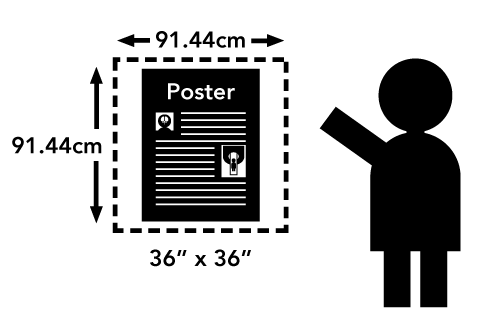
Each presenter is assigned a square space with maximum dimensions of 36 x 36 inches (approx. 92 x 92 cm). You are not required to completely fill this space, but posters exceeding these measurements, especially those extending into areas reserved for other posters, may be removed.
Mounting: Posters should be designed and printed so that they can be attached to the poster board with double-sided tape or push-pins, which will be found at each poster board. Additional tape or pins may be requested at the meeting registration desk.
Check the program book or online program to verify your program number and the day of your presentation in case there have been late changes!
Your Session
You will be assigned a program number and session by mid-March 2026. On the day of your poster session, be sure to check the program to confirm.
Suggestions for Preparing Scientific Posters
Content
- The poster should show the full title of your submission.
- Text should be brief and well organized, presenting only enough data to support your conclusions.
- The text should make clear the significance of your research.
- The text should include (most likely as separate elements of the poster) your hypothesis, methods, results, and conclusions.
Design
- A clear, simple, uncluttered arrangement is the most attractive and the easiest to read.
- For best legibility, it is suggested that the title lettering be at least 2 inches (5cm) high, with authors’ names and affiliations smaller.
- All lettering should be legible from a distance of approximately 5 feet (1.5m). It is suggested that font size should be at least 24-point. The typeface chosen should be simple and clear (e.g., Helvetica, Arial, Times).
- Color should be used sparingly to provide contrast. The featured parts of the poster can be highlighted with warm colors, and the less important parts can be done in cool colors. Some suggestions for color combinations are as follows: Green on white, red on white, black on white, blue on white, white on blue, and white on black.
- Illustrations should be simple and eye-catching, with unnecessary detail left out. If possible, convert tables to graphic displays. Pie graphs can be used to show parts of a whole, line graphs can be used to show trends or changing relationships, and bar graphs can be used to show volumes.
- Photos should be enlarged enough to show relevant detail.
- Standard computer printouts usually are not effective on posters because the type is too small and the lines are too thin to be seen from a distance.
- Patient confidentiality must be protected. No names or fully exposed faces should appear in illustrations or images.
- Remember, the poster is as much for discussion as for browsing. Be creative with the layout so that it complements your abstract!
Guidelines for
ISMRT Traditional Posters
in Cape Town
PRINTING NOTICE
You are responsible for printing, transporting, and mounting your poster. ISMRM/ISMRT does not provide these services. The PDF we request is for online viewing only.
If you do not want to travel with your poster, printers in Cape Town may be able to print it for you. You will need to find a printer that can accommodate your poster and schedule.
A poster presentation combines a visual display of the highlights of research with a question-and-answer opportunity at a specified time.
Schedule:
The ISMRT Annual Meeting will be held in the Cape Town International Convention Center. The ISMRT Meeting Room will be available for poster mounting beginning Friday, 08 May at 14:00. Your poster must be mounted by 08:00 Saturday, 09 May. The ISMRT Annual Meeting Poster Walking Tour will held from 12:30–14:00, Saturday, 09 May. Please note that light boxes will not be allowed, and power outlets will not be available.
 Measurements:
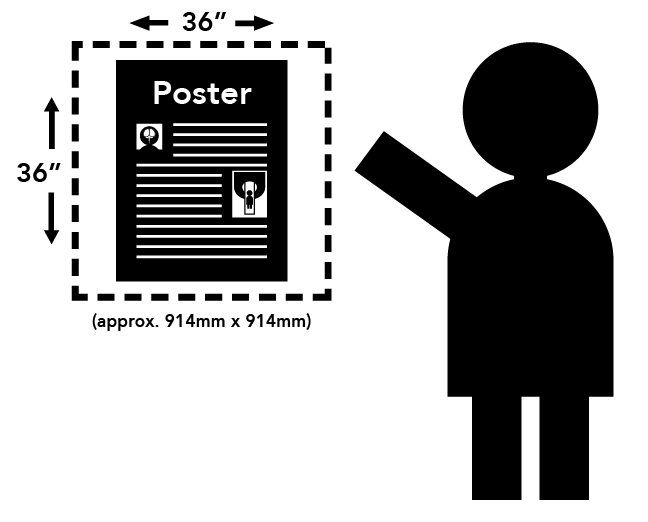
Each presenter will be allotted a poster space of 91.44 cm wide x 91.44 cm high (36 inches x 36 inches). Please do not exceed these dimensions. Posters exceeding these measurements and extending into areas reserved for other posters will be removed.
Poster PDF:
A high-resolution digital PDF of your poster must be uploaded to ECHO no later than 2 weeks before the conference, 23 April 2026, for use in the online program and to accompany your abstract. To upload, log in to ECHO, go to My Conferences, select the Cape Town meeting, select My Sessions. Here you will see the option to upload your poster.
Poster Example Files
- Clinical E-Poster Example (PDF)
- Research E-Poster Example (PDF)
Sample Poster Templates
- Clinical Focus (.ppt)
- Research Focus (.ppt)
Mounting:
Posters should be designed and constructed so they can be attached to the poster board with push pins or double-sided tape (pins & tape will be provided by the ISMRT). Your poster number and last name will be mounted on the poster board assigned to you.
During Your Session:
Poster authors are required to be present, at their posters, during the Poster Walking Tour Reception to discuss their poster with attendees and answer any questions. A photographer will take your picture with your poster to be included in the E-Signals newsletter.
After Your Session:
Your poster must remain mounted and available for viewing until 17:00 on Sunday, 10 May. If you plan to show your poster at the ISMRM Annual Meeting, Monday through Thursday, 11-14 May in the Exhibition Hall, additional instructions will be available to you prior to the Annual Meeting. If you will not be showing your poster at the ISMRM Annual Meeting, you must remove your poster by 17:30 on Sunday, 10 May. Posters not removed will be discarded.
Suggestions for Preparing Traditional Posters for On-Site Display
Content:
- The poster should show the full title of your abstract.
- Text should be brief and well organized, presenting only enough data to support your conclusions.
- The text should make clear the significance of your research.
- The text should include the categories indicated by the focus of your poster, clinical or research, as outlined in the abstract submission instructions.
- Include all references.
Design:
- A clear, simple, uncluttered arrangement is the most attractive and the easiest to read.
- The title lettering should be approximately 5cm (2 in.) high, with authors’ names and affiliations in smaller print.
- All lettering should be legible from a distance of 1.5m (5 ft.). The typeface chosen should be a simple and clear one (e.g. Times New Roman or Helvetica). Titles should be in all upper case letters, with the remainder of the text typed in a combination of capital and lower-case letters for ease of reading.
- Color should be used sparingly, and primarily to provide contrast. The featured parts of the poster can be highlighted with warm colors, and the less important parts can be done in cool colors. Some suggestions for color combinations are as follows: Green on white, red on white, black on white, blue on white, white on blue, and white on black.
- Illustrations should be simple and eye-catching, with unnecessary detail left out. If possible, convert tables to graphic displays. Pie graphs can be used to show parts of a whole, line graphs can be used to show trends or changing relationships, and bar graphs can be used to show volumes.
- Photos should be enlarged enough to show relevant detail. Standard computer printouts usually are not effective on posters, because the type is too small and the lines are too thin to be seen from a distance.
Patient confidentiality must be protected. No names (or other identifiers, i.e. social security numbers, medical record number, birthdates, etc.) should appear in illustrations.
Tips & Tricks for Presenting Your Work
Prepare a few bullet points about your poster so that you can give a quick overview of about 3 minutes in length when asked by another attendee:
- What did you study/look at and why? This could just be the title of your poster and purpose.
- Key findings – don’t forget to point out pictures and graphs on your poster to help illustrate your findings.
- What does this tell us? Why is this important in practice? This could be your conclusion and a take-home message.
Then invite questions from your audience.
Analogy:
Treat this a little bit like a weather forecast on TV with the map behind you pointing at the map to show your viewers where the main weather features are in relation to cities. Who gets sunshine, rain, wind, or severe weather conditions, except in your case you have your poster behind you, and you are showing the audience the best bits of your work.
About the Poster Tour
The session is split into 2 parts. You will receive information about which part your poster will be in:
PART 1: 11:50-14-00 (09 Saturday 2026): Half the poster presenters will present their posters in the first half of the session (40 minutes).
CHANGE OVER: Lunch, Exhibition & Poster Tour.
PART 2: 15:30-17:30 (10 Sunday 2026): Posters viewing.
This is so you can learn about everyone’s work, research, network and share ideas tips & tricks. Some people have more than one poster to present so this way you should have a chance to present both.
Poster winners will have a banner on the top and will have already presented their power pitches so should be easy to spot in the poster hall. Poster sessions are informal, you talk to small groups of people but they are highly interactive. A great way to meet Radiographers / Technologists from around the globe and find out what they do at their site/ hospital. They are a great way to learn/share tips and tricks with one another. Have a problem in your department that you do not know how to tackle. Ask around as someone may have a solution that works well or methods that didn’t work that they’ve tried. It is a perfect opportunity to learn what MRI is like for Radiographers/Technologists in another country. Make new ISMRT friends and find potential research collaborators.
Add a QR code or email on your poster so people can get in touch with you easily.
Don’t forget your phone for the poster session as you may wish to take photos of other posters in the session that you are interested in plus contact details of your new friends.
A Guide to
Effective Slide Design
Please observe these basic rules:
- Set your presentation’s page format to 16:9 widescreen. Presentations in 4:3 format (square) will end up with black bars on both sides (see illustration).
- Each slide should illustrate a single point or idea.
- Use large, legible letters.
- Do not crowd the slide.
- Message slides should contain no more than 7 lines, with 7 or fewer words per line.
- The ceilings are low in many rooms at the meeting, so screens may be smaller than you are used to – keep slides simple and uncluttered.
General PowerPoint Slide Guidelines:
- Keep the data on slides simple. If you have a great deal of data, divide it among several slides. The content of a single slide should be easily comprehended in 20 seconds. Remember: seven lines per slide and seven words per line!
- Text should be large and legible.
- If your data slides are in color, use only light colors, such as white and yellow, on a dark background, such as dark blue or black. Do not use colors such as red or purple against dark backgrounds.
- Patient confidentiality must be protected, and the patient’s a right to privacy should not be infringed upon without express informed consent. This includes removing identifying text in images, placing graphical overlays onto photographs, etc. No names or fully exposed faces should appear in illustrations or images.
- Avoid commercial references unless mandatory. A logo or institutional identification should appear only on the first title slide. Do not use such identification as a header on each slide.
- Limit the number of slides to no more than one (1) for each minute of your presentation. The slides should not contain your entire presentation. Their purpose is to support your talk and to emphasize the important points.
Word Slides:
- Title of text slides should generally contain five or fewer words.
- The space between lines should typically be the height of an uppercase letter.
Tabular Slides:
- Use graphs rather than tables if possible.
- Keep tabular slides as brief as possible.
- Two or more simple slides are better than one complicated slide.
- Make the font as large as possible.
- Do not crowd the slide.
Graph Slides:
- Keep graphs simple.
- Round off figures.
- Limit the number of captions – label key features directly with text.
- Use line graphs to show trends or changing relationships.
- Use bar graphs to compare volumes.
Chart Slides:
- Simplify charts to keep them legible.
- Break up complex charts into a series of slides.
Image Slides:
- Crop images to reduce wasted space.
- Match brightness and size/scale when showing comparisons.
- Try not to show more than 2-3 images across a slide, as they may be difficult to see from the back of the room.
- Highlight important features with arrows so you can reduce mouse usage.
- Use text titles or labels rather than a,b,c on images to show features.
- Display medical images in proper orientations, looking from left/anterior/inferior (left / front / toe).
Presenting in a Session Room:
How it Works
The following applies only to presentations in session rooms, not to any sessions in the Exhibition Hall.
For those new to presenting at ISMRM, this is a brief overview of how it works in session rooms.
During Your Presentation
When it is your time to present, you will be introduced by the moderator. Your first slide will already be on the screen when you walk up to the lectern. There will be a preview monitor on/near the head table for you to see your slides. It is not necessary to turn an look at the projection screen. The image on the preview monitor is the same image the audience sees.
Note: Displaying notes (i.e. Presenter View) is not an option.
You will control your presentation with a computer mouse at the lectern. The left mouse button will advance the slides. The right mouse button will reverse the slides. The mouse can also be used as a pointer. The mouse pointer is seen on all screens (some rooms will have more than one screen) as well as on the live stream and recording.
Note: There is no keyboard at the lectern. There is no laser pointer, and please do not use your own. They will not be visible to online viewers.
All sessions are live streamed and recorded.
Audio Tips
- Adjust the microphone so that it is in the GENERAL DIRECTION of your face. It is VERY sensitive.
- Do not bring the microphone to your mouth as you would a handheld microphone.
- Allow at least 10-15cm (4-6in) of distance between your mouth and the microphone.
- Speak in a normal speaking voice. The AV tech will adjust the sound level for the room.
The computers will be controlled by AV staff located on the side or rear of the room. If you have audio in your file, it is a good idea to notify the AV techs prior to the session. The session moderators will control a countdown clock. In addition to the time remaining, there will be a green, yellow, and red light.
- Green is your speaking time.
- Yellow means wrap up.
- Red means you are over time.
If the light turns red, moderators may ask you to stop even if you have not finished. Some sessions may have a Q&A period between presenters. Moderators will make this decision based on the if the session if operating on time. There is no connection for a laptop or other device to project at the lectern. For any other questions, email the support address in the Vital Details column or talk to the AV techs before your session begins.